
Download Road Trip Planner LITE – free Mac travel‑navigation tool
Overview
Road Trip Planner LITE est un programme léger, entièrement gratuit, conçu spécialement pour les utilisateurs macOS qui aiment prendre la route. Développée par William Modesitt, cette application de navigation vous permet de planifier des trajets longue distance, d’ajouter des points d’intérêt et de générer des itinéraires imprimables sans jamais quitter votre bureau. L’interface suit le langage de conception épuré d’Apple, ce qui la rend intuitive tant pour les routiers chevronnés que pour les explorateurs du week‑end occasionnels.
Parce qu’il s’agit d’une version « lite », le logiciel se concentre sur les fonctions essentielles de planification — création d’itinéraire, calcul du kilométrage et gestion des arrêts — tout en minimisant l’utilisation des ressources système. Vous pouvez importer des fichiers GPX existants, exporter des itinéraires vers des formats populaires et même partager votre itinéraire par e‑mail ou services cloud directement depuis l’application. Le tout fonctionne sur une plateforme sécurisée, sans publicité, garantissant la confidentialité de vos données de voyage.
Le programme est proposé en anglais, prend en charge les unités métriques et impériales, et reçoit des mises à jour régulières du développeur pour corriger les bugs et ajouter de petites améliorations. Que vous planifiiez une aventure à travers le pays, une croisière côtière pittoresque ou une simple excursion d’une journée à la montagne, Road Trip Planner LITE fournit une base fiable pour tout type de voyage.
Key Features
- Interactive Route Builder: Drag‑and‑drop waypoints on an integrated map to shape your journey in real time.
- Automatic Mileage & Time Estimates: Get instant calculations for distance, driving time, and fuel consumption based on your vehicle’s efficiency.
- Customizable Stop Management: Add attractions, restaurants, hotels, or fuel stations with notes, photos, and contact details.
- Import/Export Flexibility: Supports GPX, KML, and CSV formats for seamless data exchange with GPS devices and other planning tools.
- Offline Map Access: Download map tiles for use when you’re out of cellular range, ensuring your itinerary is always visible.
- Share‑Ready Itineraries: Export your plan as a PDF or share a link that recipients can open in any web browser.
- Multi‑Unit Support: Switch between miles/kilometers and gallons/liters with a single click.
- Regular Free Updates: The developer pushes security patches and minor feature enhancements at no cost.
Installation & Usage
Getting started with Road Trip Planner LITE is straightforward. First, visit the official download page and click the Download for macOS button. The installer is a signed .dmg file, which macOS recognizes as safe and secure. After the download completes, double‑click the .dmg to mount the disk image, then drag the Road Trip Planner LITE icon into your Applications folder. macOS may prompt you to confirm that you want to open an app from an identified developer; simply approve the request to finish installation.
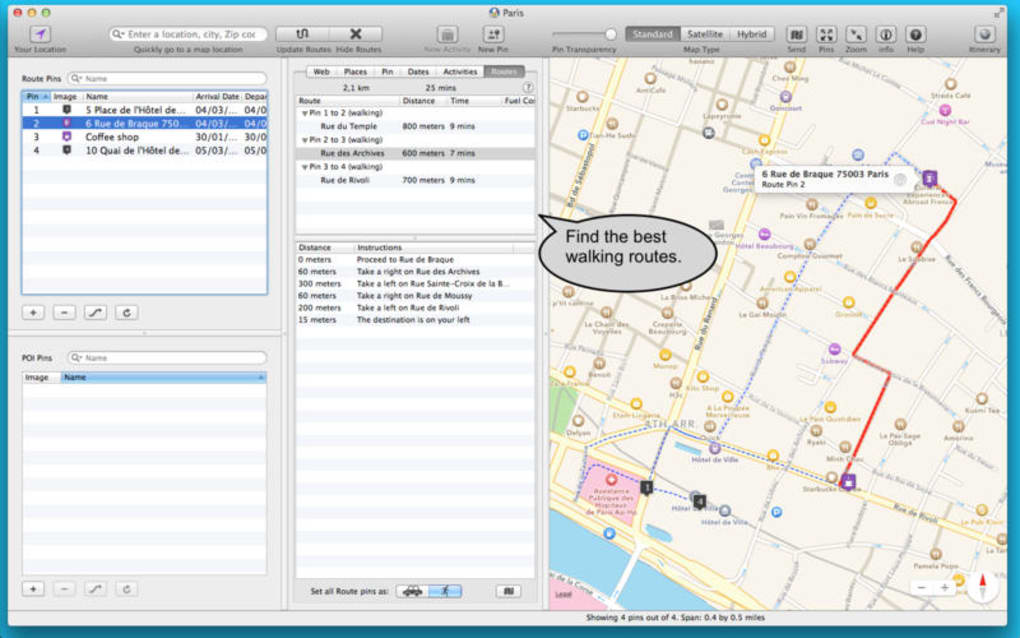
When you launch the app for the first time, a brief onboarding wizard guides you through basic settings: choosing your preferred distance unit, selecting a default map provider (Apple Maps or OpenStreetMap), and configuring fuel‑efficiency defaults. After the wizard, you’ll be taken to the main workspace, where a large map occupies the upper half of the screen and a collapsible sidebar holds your route details.
To create a new trip, click the New Route button, then either type an address in the search bar or click directly on the map to set a starting point. Continue adding waypoints by clicking the Add Stop icon, and the software automatically draws the connecting lines, updates the total distance, and estimates travel time. You can reorder stops by dragging them up or down in the sidebar, and any changes instantly reflect on the map.
The Save function stores your itinerary locally as a .rtp file, which you can reopen later or share with fellow travelers. For those who prefer cloud storage, Road Trip Planner LITE integrates with iCloud Drive, allowing you to keep your plans synced across multiple Macs. When you’re ready to hit the road, export the itinerary as a printable PDF or generate a shareable link that opens the route in any web browser, ensuring that even travelers without the app can follow your plan.
Compatibility: Road Trip Planner LITE requires macOS 10.13 (High Sierra) or later and runs efficiently on both Intel‑based and Apple Silicon Macs. The program uses native Apple frameworks, so no additional runtime (like Java or .NET) is needed.
Pros & Cons
Pros
- Completely free with no hidden ads or in‑app purchases.
- Lightweight design consumes minimal CPU and RAM.
- Intuitive drag‑and‑drop interface suited for beginners.
- Robust import/export options for GPX, KML, and CSV.
- Offline map capability keeps you guided without internet.
- Regular, security‑focused updates from the developer.
Cons
- Lacks advanced features found in premium travel planners (e.g., live traffic, multi‑day budgeting).
- No native Windows or Android version – macOS‑only.
- Map styling options are limited compared to some commercial tools.
- Exported PDFs have a simple layout; no custom branding.
Frequently Asked Questions
Is Road Trip Planner LITE really free?
Yes, the LITE version is completely free. There are no hidden fees, ads, or subscription requirements.
Can I use the app without an internet connection?
Absolutely. After you download the map tiles for your region, the entire itinerary can be viewed offline, making it perfect for remote areas.
Does Road Trip Planner LITE sync with iCloud?
Yes. When you enable iCloud Drive, your .rtp files are stored in the cloud and can be accessed from any Mac signed into the same Apple ID.
Can I import routes from my GPS device?
The app supports GPX and KML files, which most GPS devices can export. Simply use the “Import” button and select the file to load it into the planner.
Is there a way to add custom notes or photos to stops?
Yes. Each stop has a details pane where you can type notes, attach photos, and add contact information such as phone numbers or website links.
Conclusion
Road Trip Planner LITE delivers exactly what its name promises: a simple, free, and reliable tool for macOS users to map out road adventures without the clutter of premium software. While it doesn’t boast live traffic or advanced budgeting modules, its core functionality—route creation, mileage calculation, offline maps, and easy sharing—covers the essential needs of most travelers. If you’re looking for a secure, ad‑free planning app that runs smoothly on both Intel and Apple Silicon Macs, this lightweight solution is a solid choice. Download Road Trip Planner LITE today, plot your next journey, and hit the road with confidence.
Download Road Trip Planner LITE now – free and secure
Road Trip Planner LITE offers a clean, no‑frills experience that lets me focus on the road rather than fiddling with complex software. The offline maps and easy import/export capabilities are real time‑savers. Although it lacks some high‑end features, its stability and zero cost make it a top pick for casual road‑trippers on macOS.







